“I forget what happened on yesterday’s calls.”
Premium Plus
Tag and note every call — The after-call sheet opens when you hang up: pick an outcome, type a note or record a voice memo.

RecallPulse turns your Android call log into a sales tool: tag each call’s outcome as you hang up, set follow-ups that ring on time, and see who to call next. On the Business plan, managers see the team’s work calls on a live dashboard — never anyone’s personal calls.
Free plan available · every new account starts with 7 days of Premium Plus
From call log to sales system
“I forget what happened on yesterday’s calls.”
Tag and note every call — The after-call sheet opens when you hang up: pick an outcome, type a note or record a voice memo.
“I never know who to call next.”
Hot leads and follow-ups — Home shows who you talk to most and leads that went quiet, and reminders ring when it’s time to call back.
“I can’t tell how my week actually went.”
Analytics and Active Hours — Call totals for any date range and each day’s working hours are free. Premium Plus adds the drill-downs and week, month and year views.
“I only hear what reps tell me at the end of the day.”
A live team dashboard — Every rep’s work calls, tags and notes reach your dashboard within seconds.
Features
Home
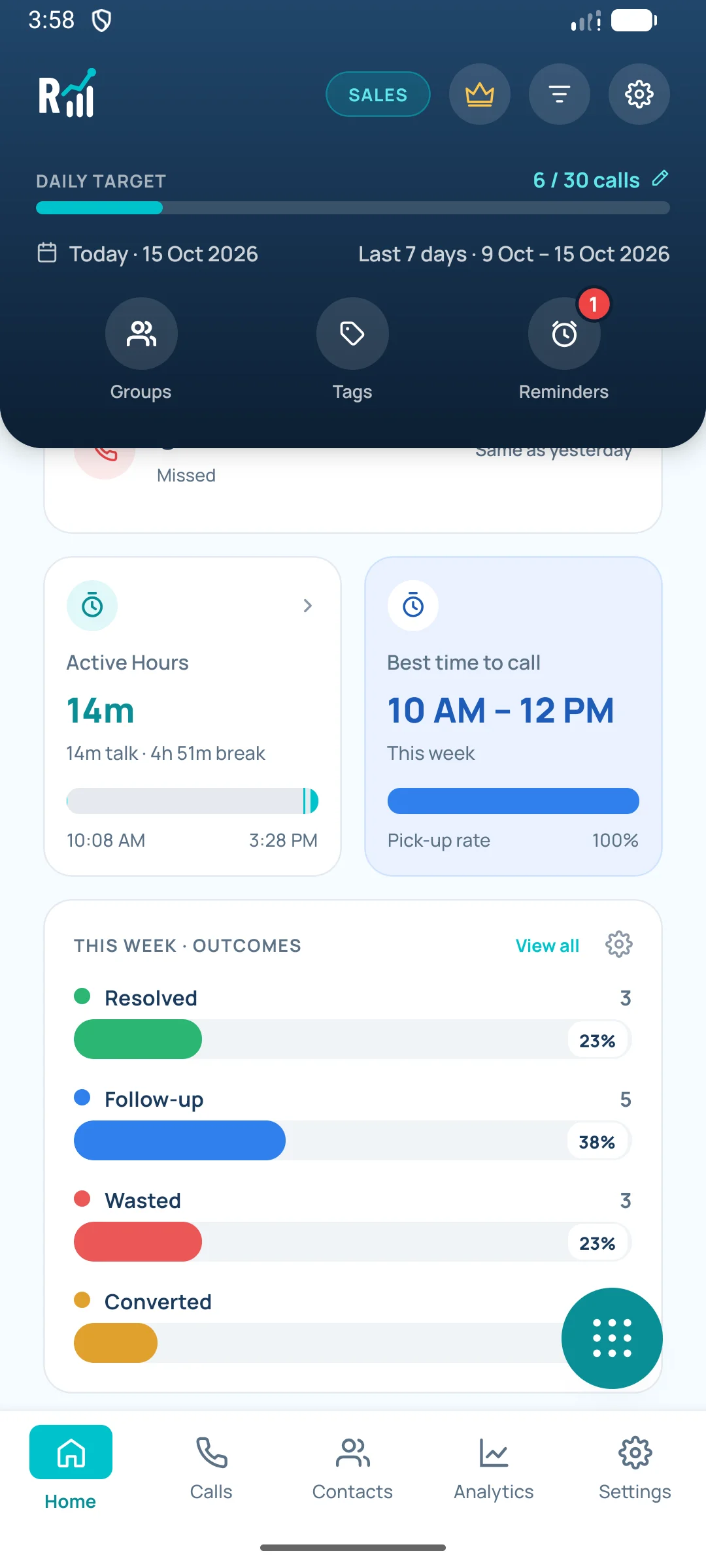
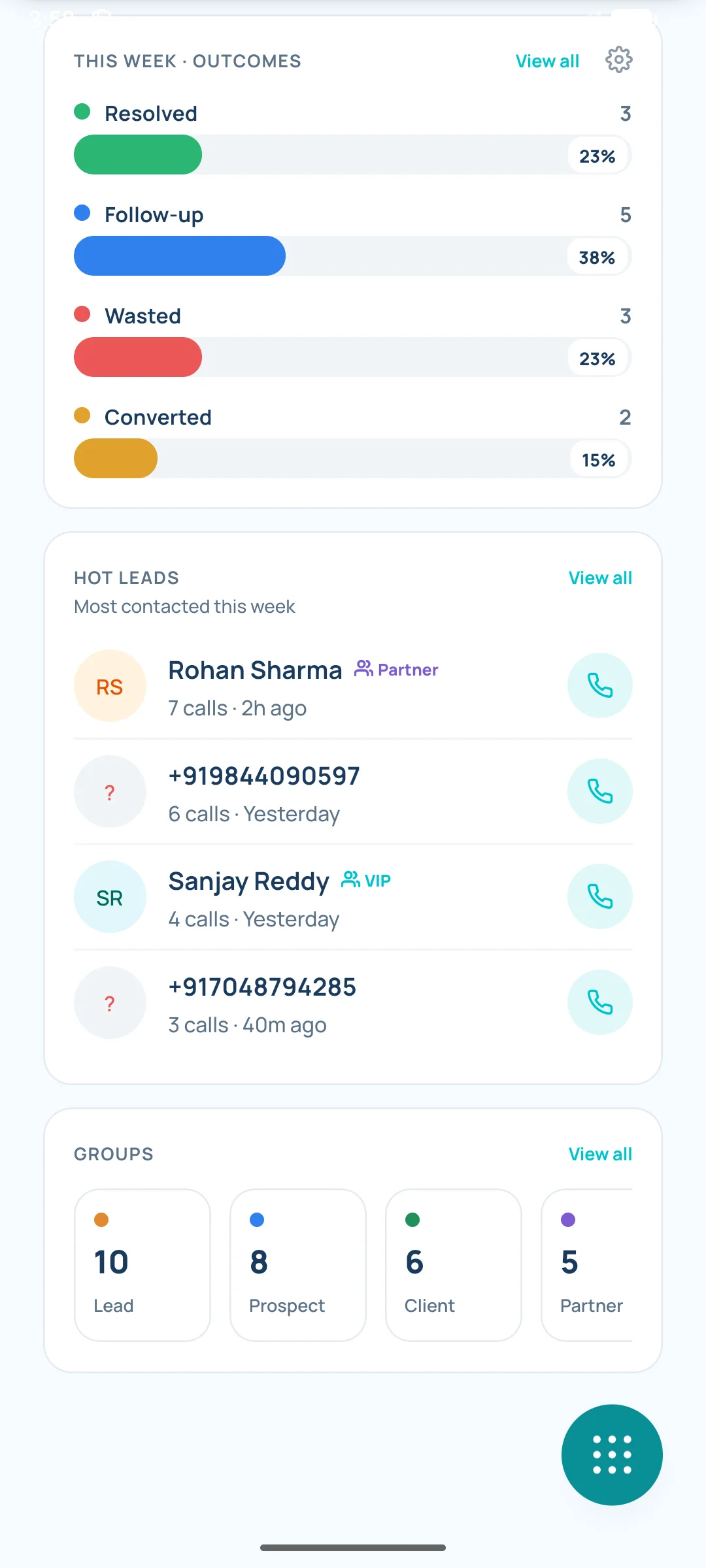
A daily call target, today’s totals and your best time to call. Premium Plus adds your outcome breakdown (Resolved, Follow-up, Wasted, Converted), Hot leads and Needs attention.
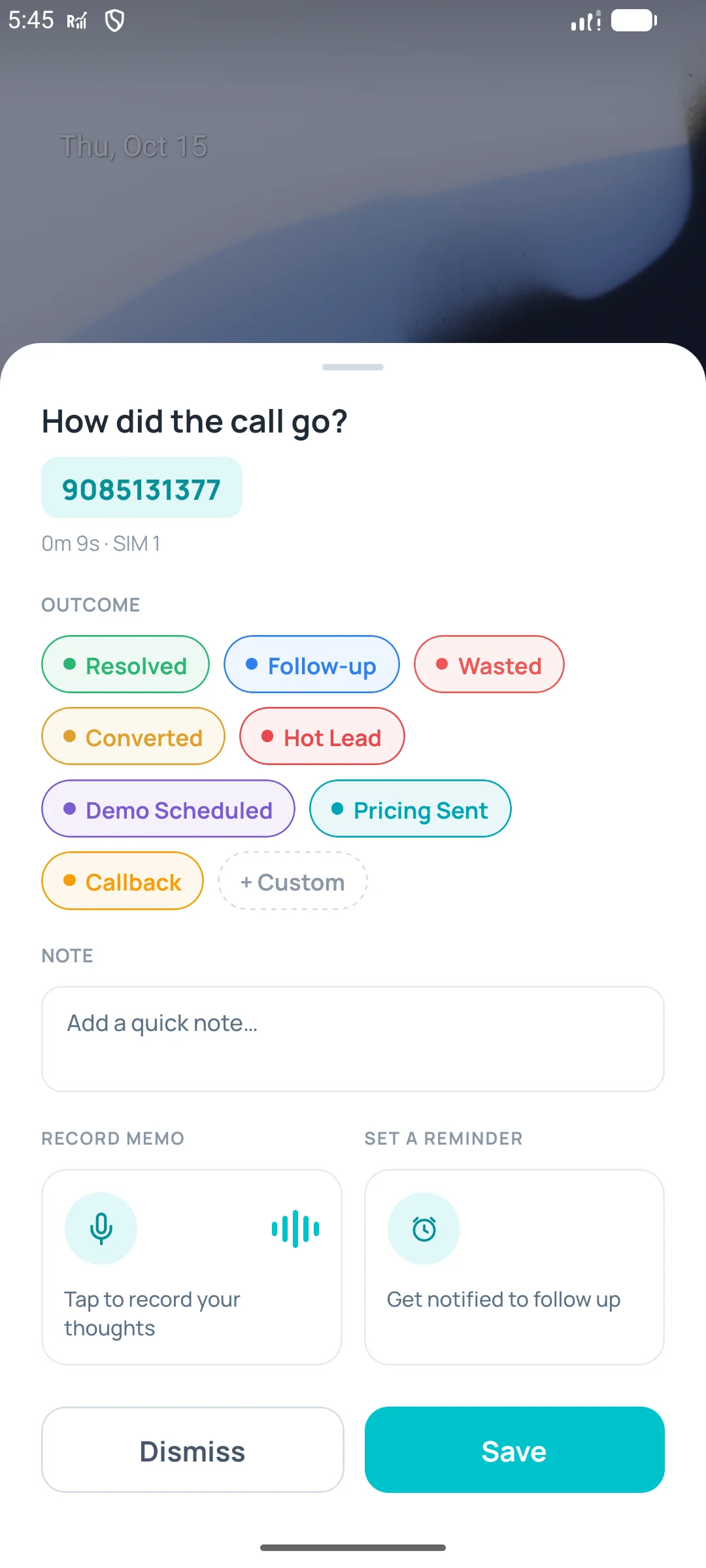
After-call sheet
When a call ends, RecallPulse asks how it went. Add a tag, a note or a voice memo in a few taps. It works even when the app is closed, and back-to-back calls queue up instead of getting lost.
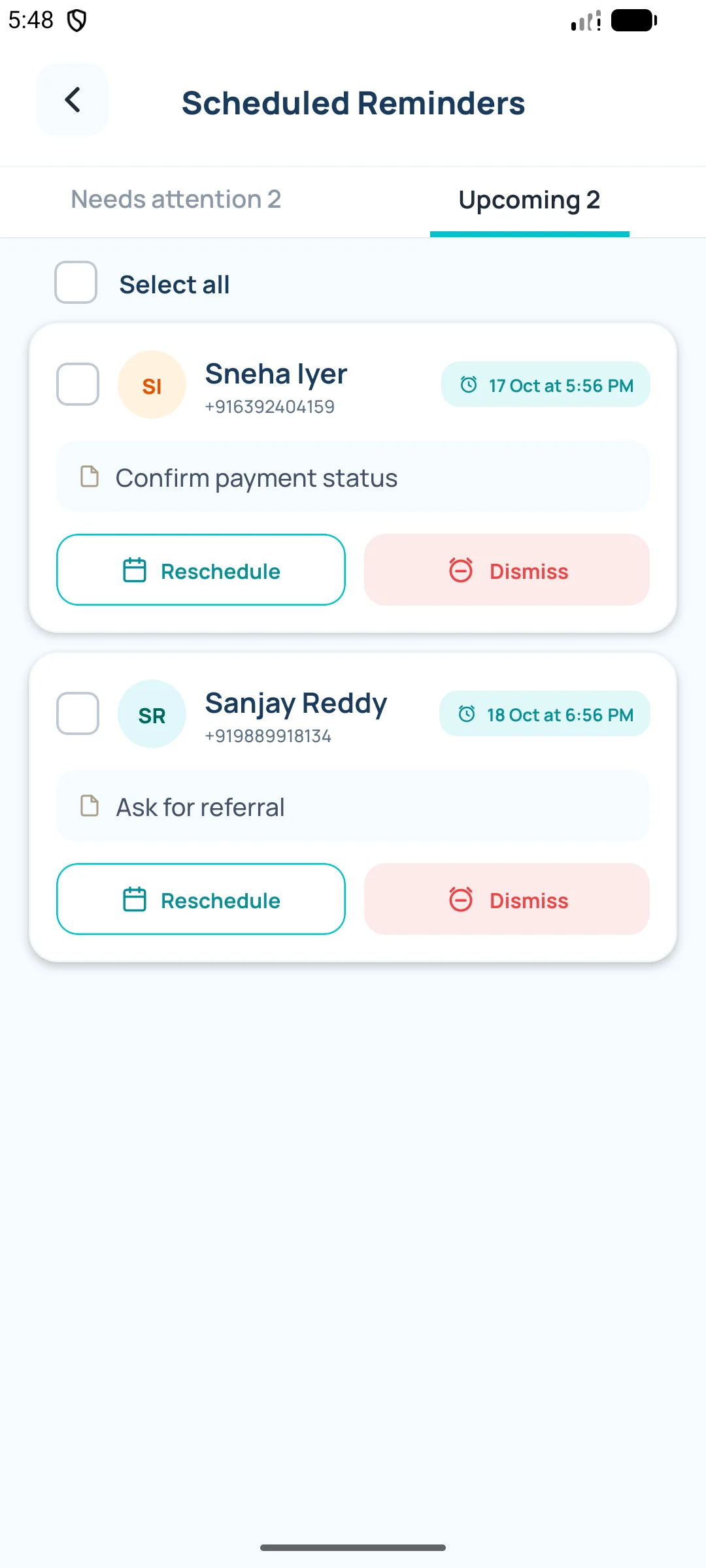
Reminders
Set one after a call, from a note or from the Call Assist bubble. When it’s due, it rings and a pop-up shows who to call, your last note and recent calls — even when the phone is locked — with Call now, WhatsApp and Mark done. It clears itself once you’ve spoken to them.
Call Assist
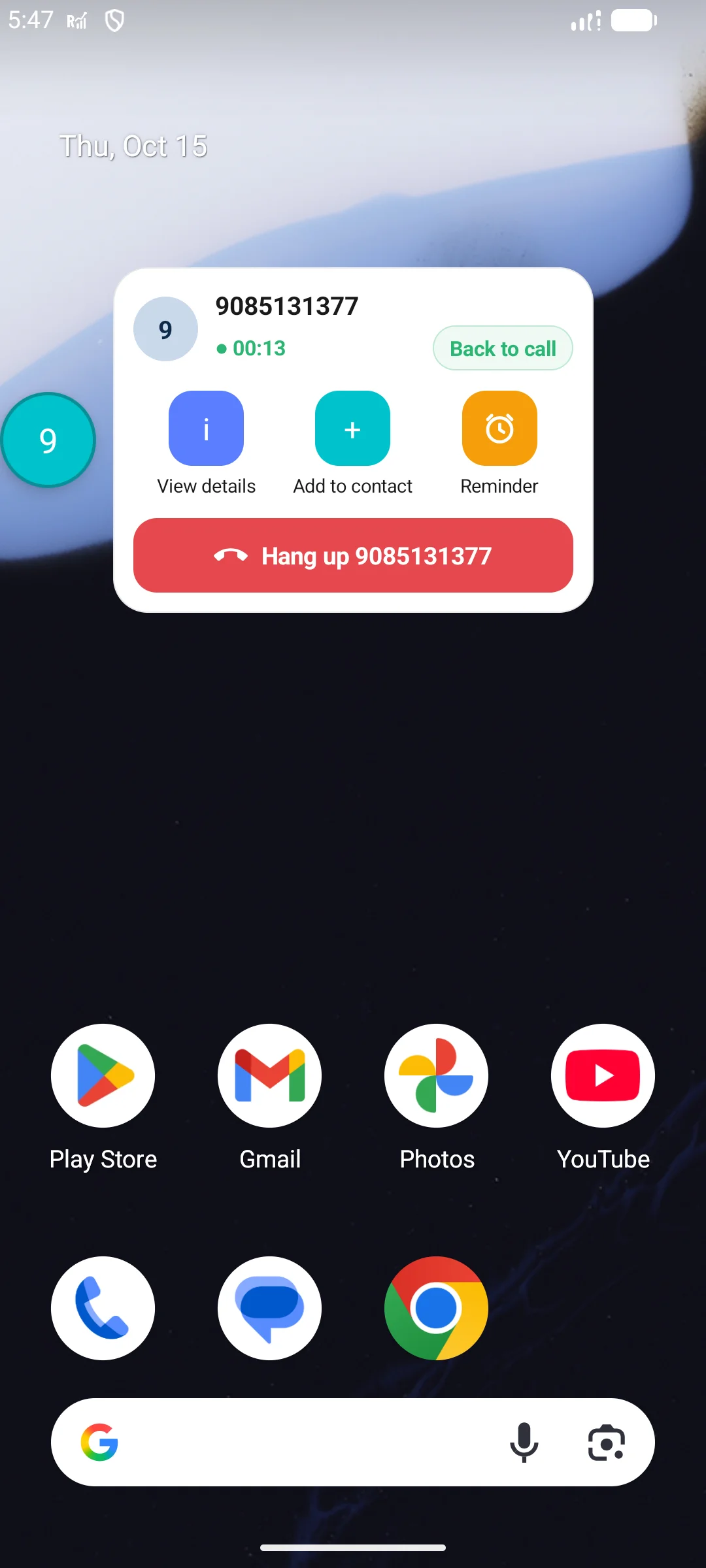
A small bubble floats over any screen during a call. Tap it to see the caller’s history, save them as a contact or set a reminder — without hanging up.
Phone app
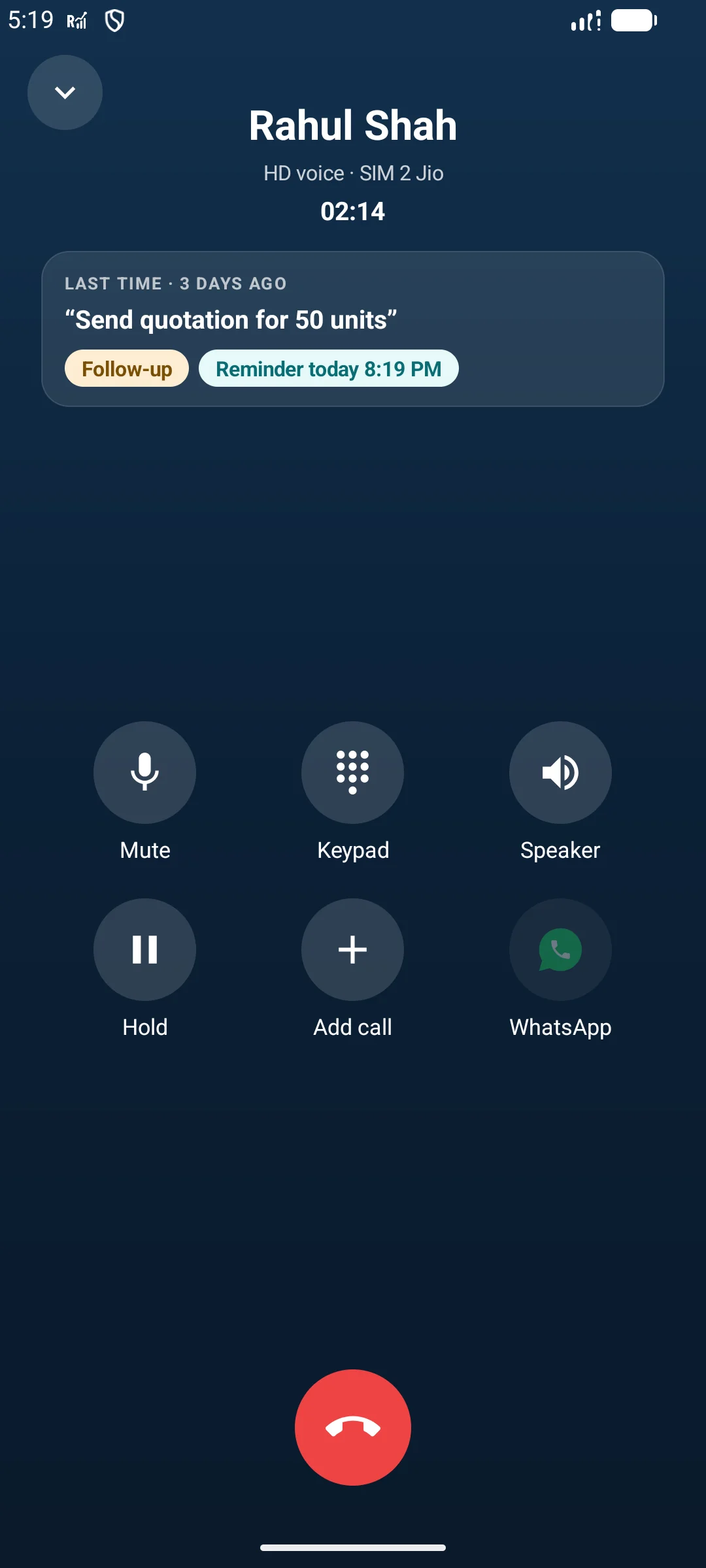
RecallPulse is a complete phone app: a keypad with smart dial, incoming and in-call screens, missed-call alerts and number blocking. Used on your own, it needs to be your default phone app, because Google Play lets only the phone app read your call log. Business reps can keep the phone app they have. On Premium Plus the call screen shows your last note, tag and any reminder for the caller.
Calls
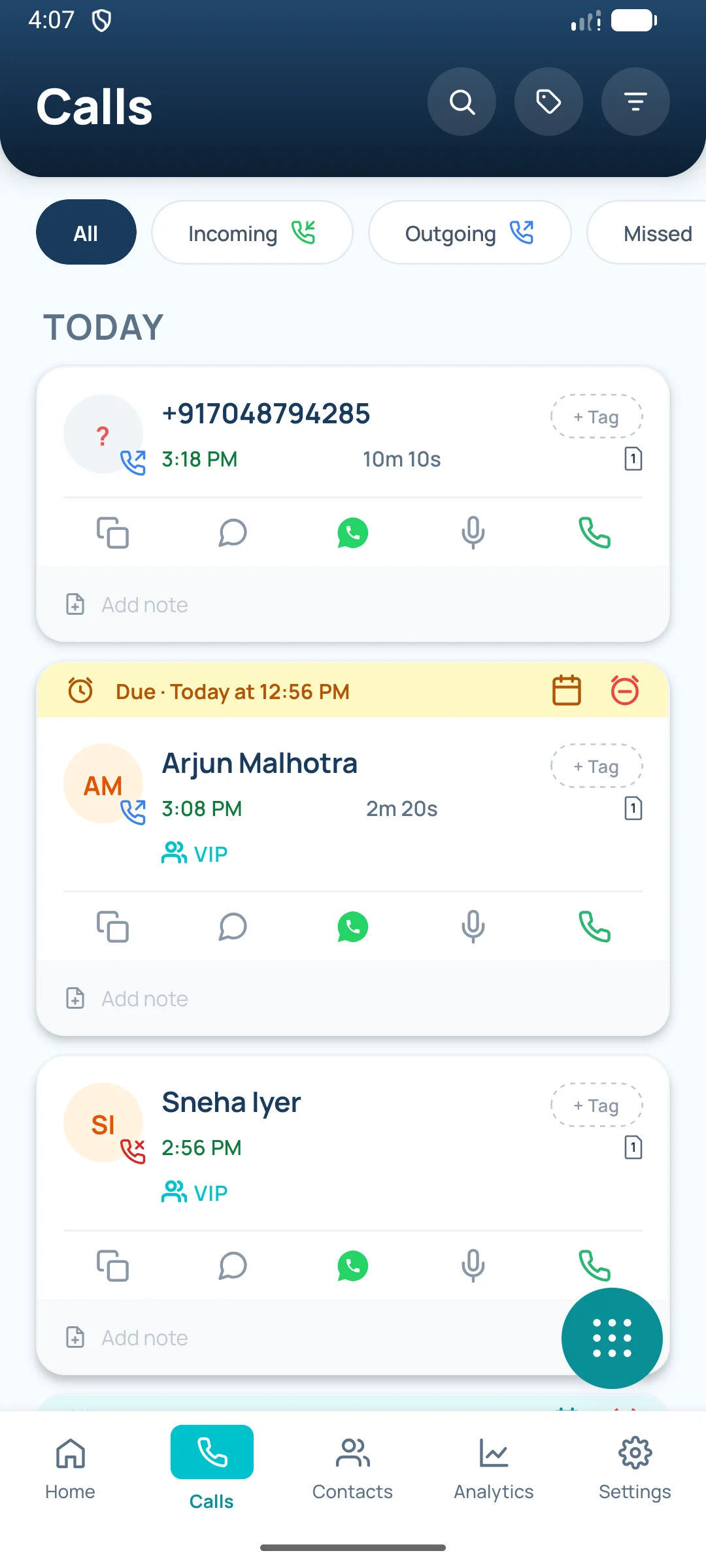
Incoming, outgoing, missed, rejected and blocked calls from every SIM. Search by name or number and filter by call type, SIM and date. Premium Plus adds tag and group filters and searches your notes.
Analytics
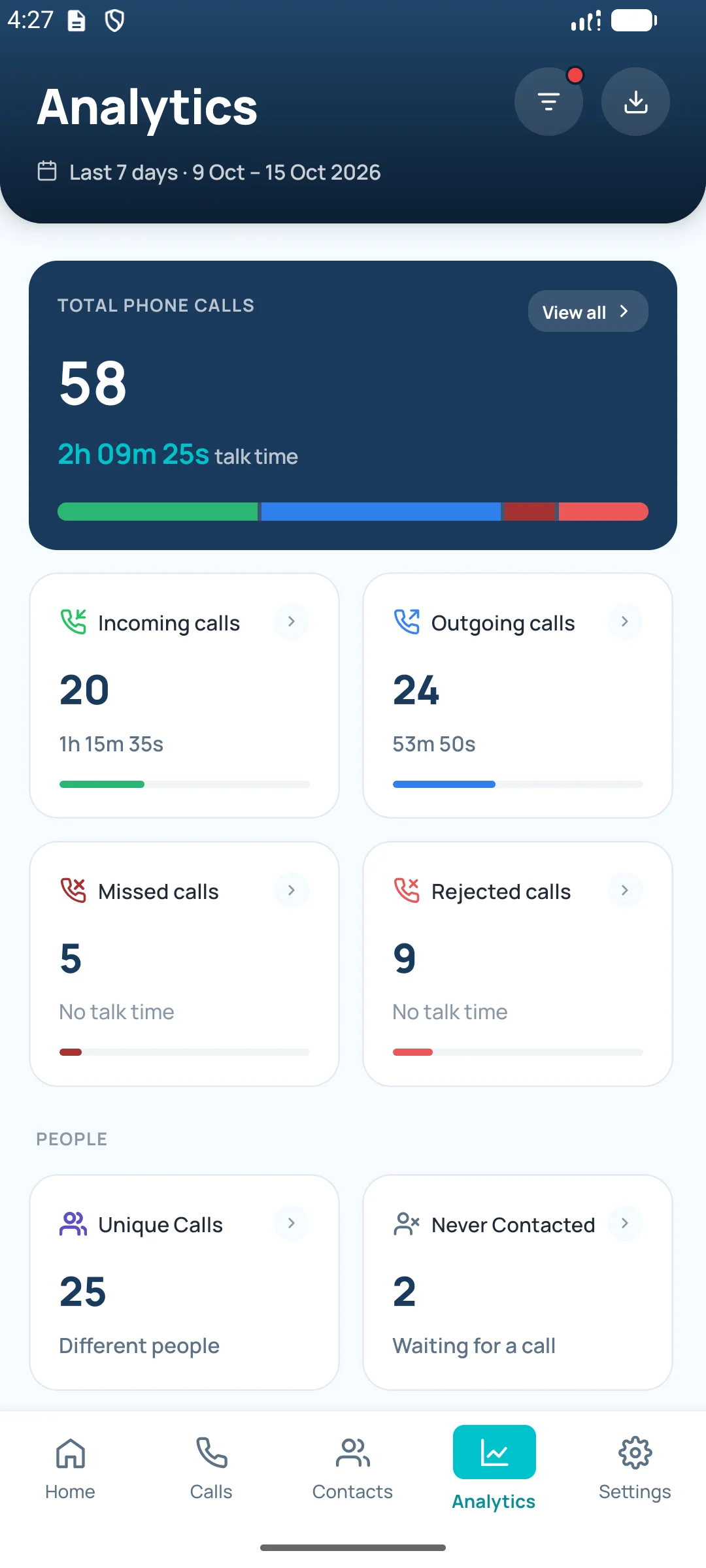
Total, incoming, outgoing, missed and rejected calls with talk time, for any date range. Premium Plus unlocks the drill-downs: Most Contacted, Never Contacted, Unique Calls and Active Hours history.
Active Hours
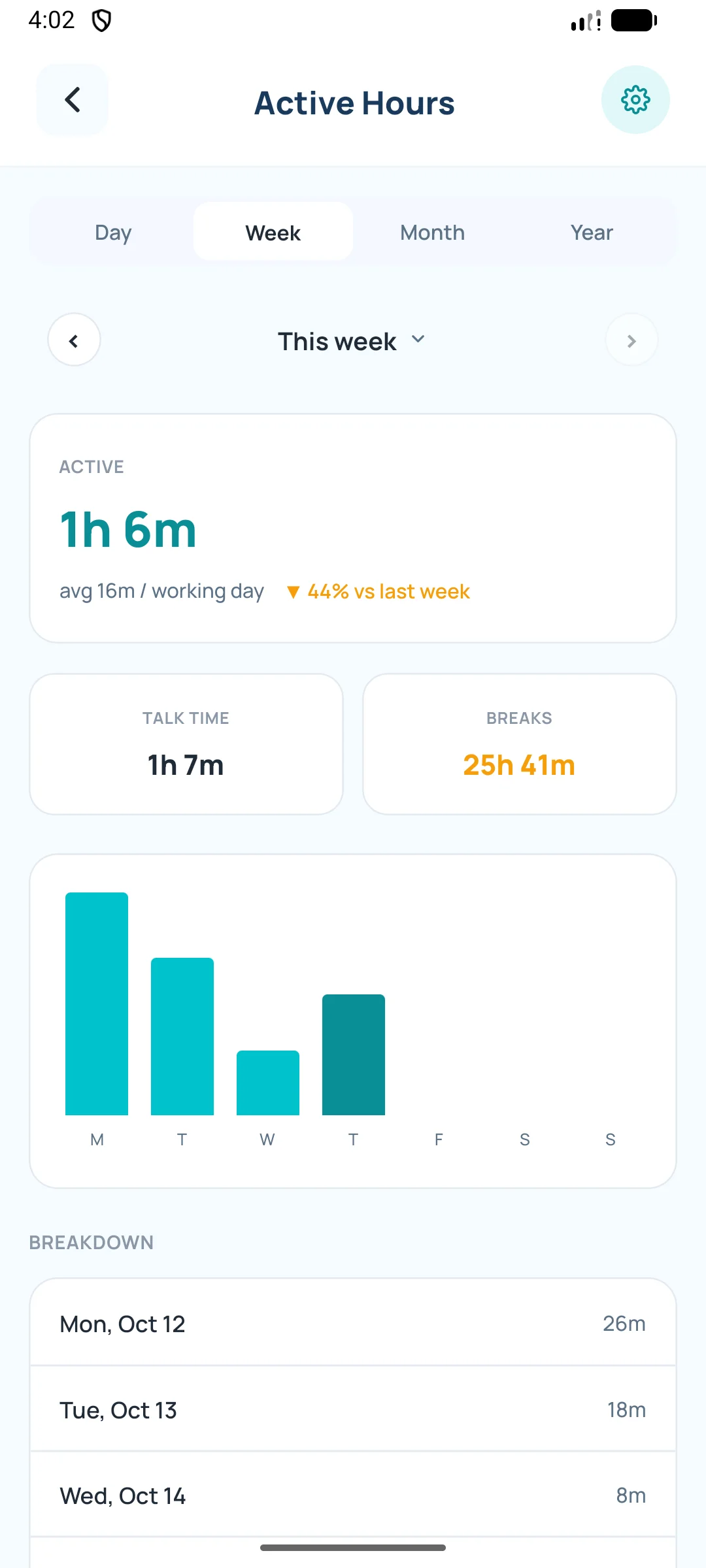
Set your working days and RecallPulse turns your calls into work sessions and breaks. Free shows each day; Premium Plus adds your wrap-up time and week, month and year views.
Pin the people you call most for free. Sorting contacts into groups is Premium Plus.
Track the outcomes that matter to your business.
Say it in ten seconds instead of typing it. Recordings stay on your phone.
Full PDF reports and an Excel CRM workbook for any period. A one-contact PDF report is free.
Premium Plus backs up your calls, notes, tags and groups to your own Google Drive, daily or weekly. On Free you can back up to a file on your phone.
Open a WhatsApp chat with any caller from their call or contact card, without saving the number.
Blocked numbers stay out of your lists, reports and team sharing. As your phone app, RecallPulse can also stop them ringing.
Shows which permission or setting needs attention, with a button to fix it.
RecallPulse Business
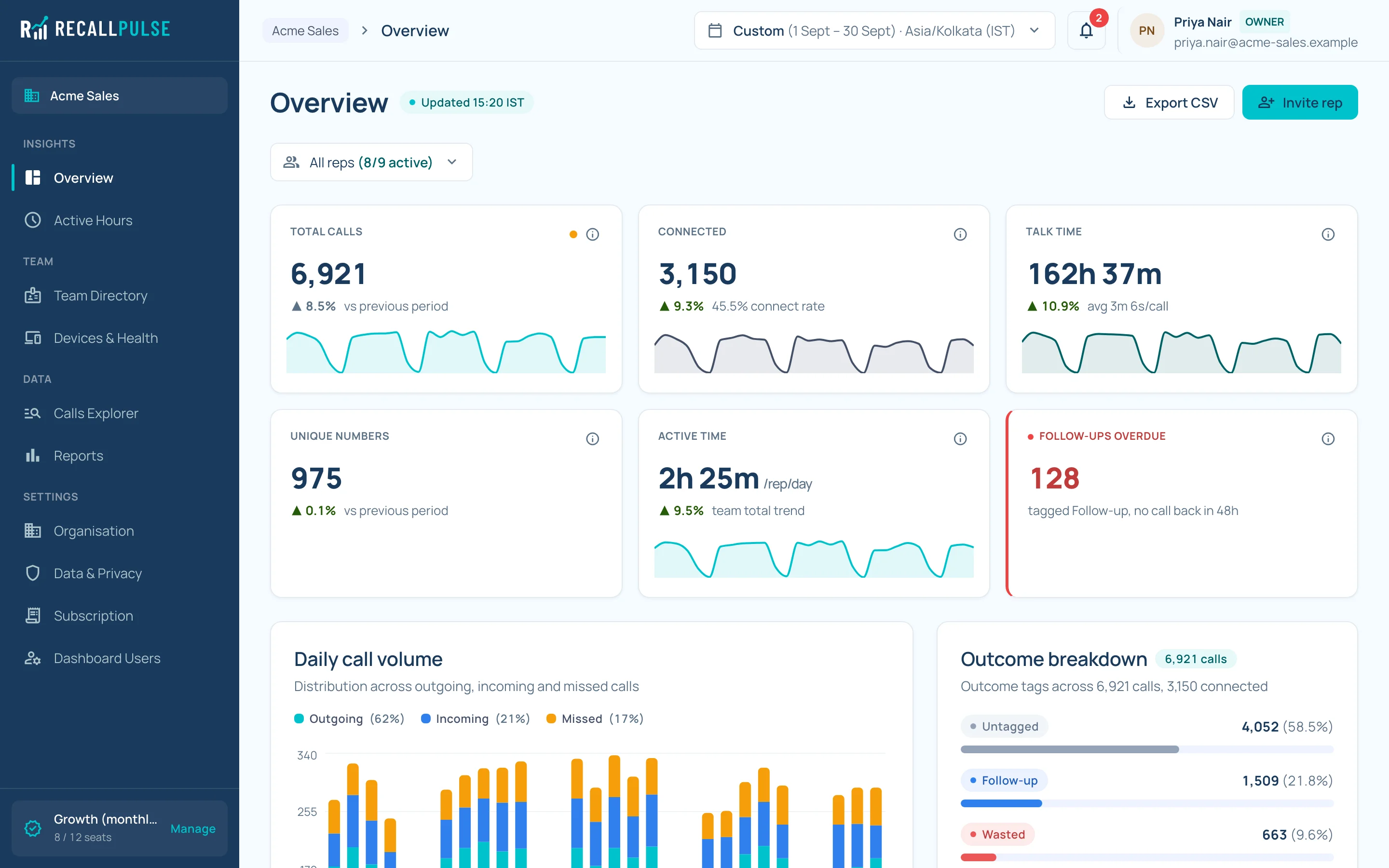
Reps keep using the RecallPulse app. You get a web dashboard with every rep's work-SIM calls, tags and notes, updated within seconds of each call.
Premium Plus for every rep — Each rep with a seat gets every Premium Plus feature in the app, with no ads.
Team call analytics — Calls, talk time, answered rate and missed calls, per rep and overall.
Calls explorer — Search and filter every team call, with the notes and tags reps add.
Rep pages — Open any rep for their daily trend, outcome mix and work sessions.
Live sync — What a rep saves after a call reaches the dashboard automatically, even if the app is closed.
Team & seat management — Invite reps by email or a 6-digit code; unlink, replace or re-invite anytime.
Device health — See whose app is off, missing a permission or hasn't synced.
Company working hours — Set the time zone, working days and wrap-up time for the whole team.
CSV export — Download call data for any period.
Secure sign-in — Password plus two-factor authentication on every dashboard account. Invite more managers any time.
How it works
Get RecallPulse on your Android phone, sign in with Google and verify your SIMs with a quick call.
Set RecallPulse as your default phone app so it can read your calls.
Add the outcome and a note while it’s fresh. Your first 7 days include Premium Plus.
See your progress any time.
What’s shared
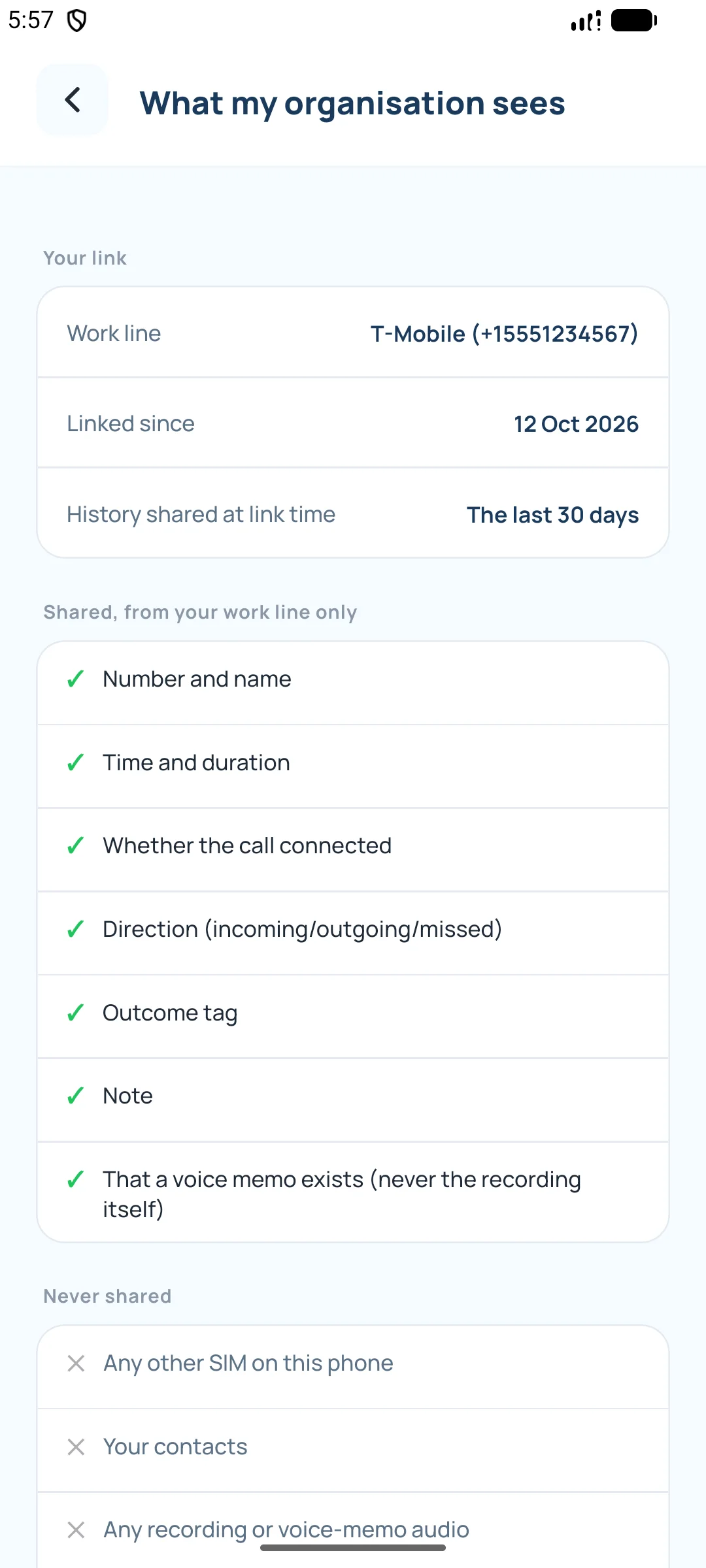
The app shows each rep exactly what their organisation can see, and they can leave at any time — sharing stops immediately.
RecallPulse doesn't record calls on any plan.
On Free and Premium Plus, your call log, contacts, notes and voice memos stay on your phone. Backups go to your own Google Drive.
Single-SIM phone? RecallPulse warns the rep that every call on it would be shared, so they can use a separate work SIM.
Pricing
Prices may change before general availability.
Every new account starts with 7 days of Premium Plus. When the trial ends you move to Free unless you buy a plan.
Includes ads. Notes, tags, voice memos, reminders and the after-call sheet need Premium Plus; notes and tags you added before stay visible.
₹0
Launching soon
Join for yourself or tell us you're interested in RecallPulse Business.
For teams
FAQ
No. RecallPulse never records call audio on any plan. Voice memos are short notes you record yourself after a call.
Android phones, including dual-SIM phones. There's no iPhone version, because iOS doesn't let apps read the call log.
If you use RecallPulse on your own, yes. Google Play lets an app read your call log only while it is your default phone app. RecallPulse is a full phone app with its own keypad, call screens and missed-call alerts, and you can switch back any time in Android’s Default apps settings — RecallPulse then stops reading your calls. Reps linked to their company’s RecallPulse Business can keep their current phone app.
Yes. Free covers your call log with search and basic filters, call totals for any date range, Favourites, Block List, best time to call, each day’s Active Hours, a one-contact PDF report and manual backup. Notes, tags, voice memos, reminders and the after-call sheet need Premium Plus. The free plan includes ads.
Every new account gets 7 days of Premium Plus. When it ends you move to Free automatically. Nothing is deleted: notes and tags you added stay visible, and buying Premium Plus unlocks everything again.
On Free and Premium Plus, your call log, contacts, notes and voice memos stay on your phone, and backups go to your own Google Drive. Your sign-in details — and, for Business, the work-SIM calls you share — are stored on our servers in the United States. See our Privacy Policy.
Only calls on the work SIM you choose: the number and name, time and duration, whether it connected, and the tag and note you add — plus the fact that a voice memo exists, never the audio. Calls on other SIMs, your contacts and call audio are never shared. You can see exactly what's shared in the app and leave at any time.
Yes. Every rep with an active Business seat gets all Premium Plus features, with no ads.
The manager invites them by work email. The rep opens RecallPulse, reviews what will be shared, picks their work SIM and accepts. A 6-digit code works too.
Any number of seats from 5, billed monthly or annually (annual saves 15%). Extra seats are ₹399 per seat per month. You can add seats at any time and reduce them at renewal.
In the app, go to Settings › Delete My Account, or email connect@recallpulse.in from the Google account you use in RecallPulse. We delete your account within 30 days. See Delete your account for what we delete and keep.
Soon, on Google Play. Join the waitlist and we'll email you on launch day. For teams, book a demo and we'll set your organisation up.