Launching soon on Google Play

Never lose a lead after the call ends.

RecallPulse turns your Android call log into a simple sales system. Record the outcome as you hang up, get reminded to follow up, and always know who to call next. With RecallPulse Business, managers see their team's work calls, shared by each rep with consent.

Free plan · Every new account gets 7 days of Premium Plus, free

Google PlayComing soon
RecallPulse Home: daily call target, pending call updates, needs attention and today's totals
Never records calls
Your call log stays on your phone
Teams: work SIM only, with consent
Dual-SIM aware
Made in India
Available worldwide

Early users

ForthtechCoir & Jute Home DecorVUNAQ

From call log to sales system

The details that slip away now have somewhere to go.

“I forget what happened on yesterday’s calls.”

Tag and note every call — The after-call sheet opens when you hang up: pick an outcome, tick the products they asked about, type a note or record a voice memo. Free includes 10 notes and 5 voice memos a day.

“I never know who to call next.”

Hot leads and follow-ups — Reminders ring when it’s time to call back, and Home shows the missed calls you haven’t returned. Free sets 3 new reminders a day; Premium Plus adds Hot leads, the people you talk to most.

“I can’t tell how my week actually went.”

Analytics and Active Hours — Free shows call totals for any date range and Active Hours for each of the last 14 days. Premium Plus adds the drill-downs and week, month and year views.

“I only hear what reps tell me at the end of the day.”

Business

A live team dashboard — Every rep's work calls, tags and notes reach your dashboard, and reps stay in control: they choose the work SIM and can leave any time.

Features

Call notes, follow-up reminders and call analytics in one Android app

Home

Your day at a glance

A daily call target, today’s totals, calls still waiting for a note, missed calls you haven’t returned, your outcomes this week and your best time to call. Premium Plus adds Hot leads: the people you talk to most.

RecallPulse Home: top products, Active Hours, best time to call and this week's outcomes

After-call sheet

Tag it before you forget it

When a call ends, RecallPulse asks how it went. Add a tag, the products they asked about, a note or a voice memo in a few taps. It works even when the app is closed, and back-to-back calls queue up instead of getting lost. Free includes 10 notes and 5 voice memos a day; Premium Plus has no limits.

After-call sheet: outcome, products, note, voice memo and reminder, with today's Free-plan counts

Reminders

Follow-ups that ring on time

Set one after a call or from the Call Assist bubble. When it's due it rings, even on the lock screen, with the person's name, your note and one-tap Call or WhatsApp. Missed it? RecallPulse reminds you again, and clears it once you've spoken. Free sets 3 new reminders a day; Premium Plus has no limit.

Scheduled reminders with notes, Reschedule and Dismiss

Call Assist

Context while you’re on the call

A small bubble floats over any screen during a call. Tap it to see the caller’s history, save them as a contact or set a reminder, without hanging up. Included on Free, within the same daily limits.

Call Assist bubble during a call: view details, set a reminder, share products or hang up

Phone app

Your phone app, built for sales

RecallPulse is a complete phone app: keypad with smart dial, incoming and in-call screens, missed-call alerts and number blocking. Making it your phone app is optional — it gives the most reliable after-call sheet and call screens. You can switch back any time in Android's Default apps settings. On Premium Plus the call screen shows your last note, tag and any reminder for the caller.

RecallPulse in-call screen with mute, keypad, speaker, hold, add call, WhatsApp and products

Calls

Your whole call log, searchable

Incoming, outgoing, missed, rejected and blocked calls from every SIM. Search by name, number, note, tag or group, and filter by call type, SIM, date, tag and group.

Calls list with a reminder, outcome tags, groups, products and notes

Analytics

Numbers you can act on

Total, incoming, outgoing, missed and rejected calls with talk time, for any date range. Premium Plus unlocks the drill-downs: Most Contacted, Never Contacted, Unique numbers and Active Hours history.

Analytics: total, incoming, outgoing, missed and rejected calls with talk time

Active Hours

See where your day went

Set your working days and RecallPulse turns your calls into work sessions and breaks. Free shows each of the last 14 days; Premium Plus adds your wrap-up time and week, month and year views.

Active Hours day view: active time, talk time, breaks and work sessions

Know what customers ask for

Keep a list of the products you sell, tick what the customer asked about after the call, and send the details on WhatsApp, SMS or email, even during the call. Home shows your top products. Free keeps 5 products; Premium Plus up to 1,000.

Favourites & Groups

Pin the people you call most and sort contacts into groups. Free keeps up to 4 groups; Premium Plus has no limit.

Custom tags

Track the outcomes that matter to your business. Free keeps 4 tags; Premium Plus has no limit.

Voice memos

Say it in ten seconds instead of typing it. Recordings stay on your phone. Free: 5 a day; Premium Plus: no limit.

PDF & Excel reports

A one-contact PDF report is free, with notes, voice memos, tags and groups. The full PDF reports and the Excel CRM workbook are Premium Plus.

Google Drive backup

Premium Plus backs up to your own Google Drive, daily or weekly. On Free, save a backup file to your phone.

WhatsApp in one tap

Open a WhatsApp chat with any caller from their call or contact card, without saving the number.

Block List

Blocked numbers stay out of your lists, reports and team sharing. As your phone app, RecallPulse can also stop them ringing.

App Health

Shows which permission or setting needs attention, with a button to fix it.

RecallPulse Business

Know which leads your team is following up, and which are slipping.

Every rep's work calls, outcomes and follow-ups reach one sales team dashboard within seconds. See who needs a call back, which leads are going cold, who is on target, and which products customers ask about. Reps choose the work SIM and agree first, and nothing personal is ever shared.

See every lead

Calls explorer — Search and filter every team call by rep, outcome, length or hour, with the notes and tags reps add — and save the filters you use as views the whole team can open.

Leads at risk — Missed calls nobody returned, follow-ups that are overdue, and numbers called again and again with no outcome, each with the rep responsible.

What needs your attention — A short list of what needs you today, most urgent first. Open any item to see the calls behind it.

Lead coverage — How many customer numbers have been called once, twice or three times or more, and which were never answered.

Coach the team

Team targets & leaderboard — Set a daily connected-calls target for the team. It is shared between the active reps, and any rep can have their own. The Overview ranks reps and shows each one against their target.

Team call analytics — Calls, talk time, answered rate and missed calls, per rep and overall.

Rep profiles — Open any rep for their daily trend, outcome mix, work sessions and the products their customers asked about.

Work-hour adherence — Set the team's time zone, working days and hours, then see late starts, early finishes and idle time for each rep.

Active Hours — See which hours the team is on the phone and which hours go quiet.

Know what sells

Product catalogue — Add your products on the dashboard or import them from a CSV file. Reps get the list in the app the next time it syncs.

Product enquiries — See which products customers ask about, by rep and by day, week or month, and which calls had no product ticked. Export it as CSV.

Top products — The products customers ask about most, on the Overview and on each rep's profile.

Run it with confidence

Premium Plus for every rep — Each rep with a seat gets every Premium Plus feature in the app, with no ads.

Team & seat management — Invite reps by email or a 6-digit code. Reps review and accept before anything is shared. Unlink, replace or re-invite any time.

Device health — See whose app is off, missing a permission or hasn't synced, with an alert on the dashboard when a phone goes quiet (permission and sync status only — never call content).

PDF & Excel reports — Eight ready-made reports for any period — Executive summary, Team performance, Rep scorecard, Missed-call recovery and more. The Call log downloads as Excel with your Calls explorer filters.

Owner and Manager sign-in — Two dashboard roles, Owner and Manager, each with a password and two-factor authentication. The owner can add managers any time.

Data & privacy page — A consent log of who agreed to share and when, a ready-to-adapt employee notice, your retention setting, and a record of every time RecallPulse support viewed your data.

How it works

Start following up every sales call

  1. 01

    Install and sign in

    Install RecallPulse and sign in with Google. Tick the Terms and Privacy Policy, then confirm your SIMs with one short call.

  2. 02

    Allow call-log access

    Allow call-log access and, if you like, make RecallPulse your phone app for the best experience. You can switch back any time.

  3. 03

    Hang up, tag the call, done

    Add the outcome and a note while it is fresh. Your first 7 days include Premium Plus.

  4. 04

    Check Home each morning

    Who to call, what's overdue, how yesterday went.

What’s shared

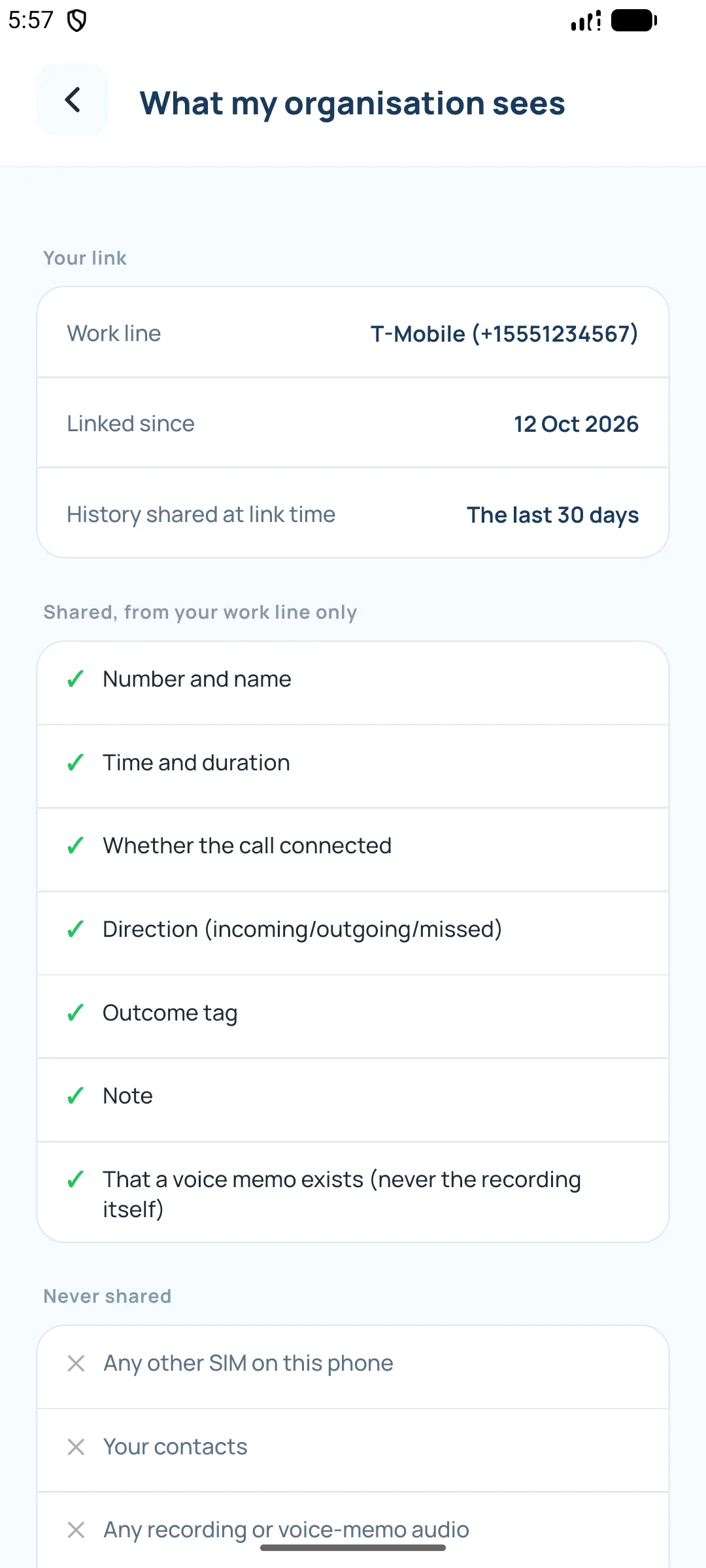
Your manager sees work calls and whether the app is working. Never anything personal.

Reps see what you see.

The app shows each rep exactly what their organisation can see.

A notice while sharing is on.

Linked phones show “Work-call sharing is on” for as long as they share.

Leave at any time.

Reps can leave in Settings; sharing stops immediately.

No call recording, ever.

RecallPulse doesn't record calls on any plan.

Your data stays yours.

On Free and Premium Plus, your call log, contacts, notes and voice memos stay on your phone. Backups go to your own Google Drive.

Built on consent, not surveillance

No call recording. No location. No personal calls. No hidden mode.

Reps see exactly what you see, choose one work SIM, and can leave at any time. The app shows a notice while work calls are shared. RecallPulse Business is for teams that agree to share work calls — not for secret tracking.

What reps see →

Single-SIM phone? RecallPulse warns the rep that every call on it would be shared, so they can use a separate work SIM.

Early users

What our early users say

“Our engineers and sales team call clients and vendors all day, and follow-ups used to live in someone's notebook. Now every work call is tagged the moment it ends, and I can see on the dashboard who still needs a call back. The team was comfortable from day one — it never records calls, and only the work SIM is shared.”

Darshan Sonani

CEO & Head of Sales, Forthtech

ForthtechBusiness
“Most of our orders start with a phone call — a shop asking about jute rugs, a customer checking a doormat size. I add a short note and a reminder right after the call, and the reminder rings on time, so no enquiry goes cold any more.”

Shantibhai Goyani

CEO, Coir & Jute Home Decor

Coir & Jute Home DecorPremium Plus
“Our buyers order on WhatsApp and Flipkart, but retailers and repeat customers still call. Tagging each call as Follow-up or Converted shows me exactly who to ring next, and when a reminder pops up I can call or WhatsApp them in one tap.”

Vinay Goyani

CEO, VUNAQ

VUNAQPremium Plus

Pricing

Launch pricing that grows with you

Prices may change before general availability.

Every new account starts with 7 days of Premium Plus. When the trial ends you move to Free unless you buy a plan.

Free

  • After-call sheet, Call Assist and reminders that ring on time
  • 10 notes, 5 voice memos and 3 reminders a day
  • Keep 4 tags, 4 groups and 5 products
  • Search your calls and notes; filter by call type, SIM, date, tag and group
  • Call totals and talk time for any date range
  • Outcomes on Home, and top products for the last 7 days
  • Active Hours for each of the last 14 days
  • One-contact PDF report
  • Favourites, Block List and App Health
  • Manual backup to a file (after a short ad)

Shows ads (none in your first 12 hours). A short video adds a few more notes, voice memos or reminders for the day. Nothing you added is ever deleted when you reach a limit or your trial ends.

₹0

Premium Plus

Choose a duration

₹1,299 / 12 months

Prepaid · no auto-renewal · activated on your Google account within minutes

Join the waitlist
  • No ads
  • No daily limits on notes, voice memos and reminders
  • Unlimited custom tags and groups, and up to 1,000 products
  • After-call sheet and Call Assist with no limits
  • Unlimited follow-up reminders
  • Full analytics: Hot leads, Most Contacted, Never Contacted, Unique numbers
  • Full history in Product enquiries and Top products
  • Active Hours by week, month and year, with your wrap-up time
  • Full PDF reports and the Excel CRM workbook
  • Automatic Google Drive backup, daily or weekly
  • Your last note, tag and reminder on the call screen

Coming soon for Premium Plus

  • — AI call-note summary
  • — WhatsApp / SMS quick templates
  • — Dark mode & themes

Coming soon for Business

  • — Your company logo on reports
  • — CRM integrations (Zoho, HubSpot) & API / webhooks
  • — Scheduled email reports & audit log

Launching soon

Be first to know when RecallPulse reaches Google Play.

Join for yourself or tell us you're interested in RecallPulse Business.

We use your email only to tell you when RecallPulse launches. It is sent through Formspree (United States). You can unsubscribe at any time. See our Privacy Policy.

For teams

See how RecallPulse Business would work for your team.

  • See it running on real call data
  • Get your team set up in a day
  • Ask anything about privacy and data handling

We use your email only to reply to your demo request. It is sent through Formspree (United States). You can unsubscribe at any time. See our Privacy Policy.

FAQ

Questions before launch

Does RecallPulse record my calls?

No. RecallPulse never records call audio on any plan. Voice memos are short notes you record yourself after a call, and they stay on your phone.

Which phones does it work on?

Android phones, including dual-SIM phones, in any country. There is no iPhone version, because iOS does not let apps read the call log.

Do I have to make RecallPulse my phone app?

No, it's optional. RecallPulse reads your call log on your phone after you allow it. Making it your phone app is recommended — it gives the most reliable after-call sheet and call screens — and you can switch back any time in Android's Default apps settings.

Is there a Free plan?

Yes. Free includes the after-call sheet, Call Assist and reminders, with 10 notes, 5 voice memos and 3 reminders a day and up to 4 tags, 4 groups and 5 products. It also has search and filters, call totals for any date range, Active Hours for the last 14 days, Favourites, Block List, a one-contact PDF report and manual backup (after a short video ad). A short video adds a few more notes, voice memos or reminders for the day. The Free plan shows ads; Premium Plus removes the ads and the limits.

What happens after the 7-day trial?

Every Google account gets one 7-day Premium Plus trial. When it ends you move to Free automatically. Nothing is deleted: the notes, tags and groups you added stay. If you have more than Free allows, for example 6 tags, you keep them all but can't add more until you're under the limit. Premium Plus removes the limits again.

How do I pay, and does it renew?

Plans are bought on recallpulse.in with UPI, cards or net banking through Cashfree Payments. Prices are in Indian rupees, and cards issued outside India are accepted. Plans are prepaid and never renew automatically. They are not sold inside the app.

Can I get a refund?

A paid period is not refundable, but duplicate or failed charges are refunded in 5–7 working days. If you are a consumer in the EU or UK, you also have a 14-day withdrawal right in some cases. See our Refund & cancellation policy.

Does the Free plan show ads?

Yes — small Google banners, an occasional full-screen ad and a short video before a manual backup. When you reach a daily limit you can also choose to watch a short video for a few more notes, voice memos or reminders that day. Premium Plus and Business have no ads, and no ads appear in your first 12 hours. In the EU, UK and Switzerland, you choose first in Google's consent form.

What is the reminder pop-up?

When a follow-up is due, a small box opens in the middle of the screen — even on the lock screen — with the person's name, your note, the last call, and Call now, WhatsApp, Open details and Mark done. You can turn it off in Settings › Reminder Notifications.

Where is my data stored?

On Free and Premium Plus, your call log, contacts, notes and voice memos stay on your phone, and backups go to your own Google Drive. Your sign-in details — and, for Business, the work-SIM calls you agree to share — are stored on our servers in the United States. See our Privacy Policy.

My company uses RecallPulse Business. What can my manager see?

Only calls on the work SIM you choose: the number and name, time and duration, whether it connected, the tag and note you add, and the products you mark on the call if your company keeps a product list — plus that a voice memo exists (never the audio). Also your Google email, the name your company entered, your SIM details and a device-health report. Never other SIMs, your contacts or call audio. You see exactly what is shared in Settings › My organisation, and you can leave at any time. See For team members.

Does Business include Premium Plus for reps?

Yes. Every rep with an active Business seat gets all Premium Plus features, with no ads.

Can I make my team share personal calls?

No. Only one work SIM, chosen by the rep, and only after the rep accepts. Reps can leave at any time, and the app shows a notice while sharing is on. You are responsible for telling your team and following the labour and data-protection laws where they work.

How do reps join a team?

The manager invites them by email or a 6-digit code. The rep opens RecallPulse, reviews what will be shared, picks their work SIM, ticks the Privacy Policy box and accepts.

How does Business billing work?

Business is billed per seat, from 5 seats, monthly or annually. Pricing depends on your team size — book a demo or contact us for a quote. You can add seats at any time and reduce them when you renew.

How do I delete my account?

In the app (Settings › Delete My Account), online at app.recallpulse.in/delete-account with your Google account, or by email to connect@recallpulse.in. Your account is deleted 14 days after you ask, and you can cancel until then. See Delete your account for what we delete and keep.

Where can I use RecallPulse?

Anywhere in the world, on Android phones with Google Play.

When does RecallPulse launch?

Soon, on Google Play. Join the waitlist and we'll email you on launch day. For teams, book a demo and we'll set your organisation up.